Your coding agent knows XAF. It has never seen your application.
An AI agent can recite the XAF documentation and still be confidently wrong about your app, because a third of what an XAF application does isn't in the business classes at all. Here's what I built to fix that, and the four places behaviour hides.
▶ See how it works — free, MIT, no DevExpress licence needed.Ask your AI assistant to add a validation rule to Invoice and watch what happens. It writes fluent XAF. RuleCriteria, the right context, a CustomMessageTemplate, everything in the right place. Then it references Invoice.TotalAmount, and your class has a Total. Or it filters on [Status] = 'Approved' when your application stores an enum. Or it adds a column that a Model Editor customization is going to hide the moment the app runs.
It isn't hallucinating XAF. It knows XAF. It has just never seen your XAF.
DevExpress has done excellent work closing part of this gap. There are official agent skills that teach an agent how the framework works, and a Docs MCP server that gives it the official reference. Both are genuinely good. Neither has read a single line of your codebase.
So I built the third piece, and made it free and MIT: XAF Logic Explainer.
| Teaches the agent… | Tool |
|---|---|
| How XAF works in general | DevExpress agent-skills |
| What the official documentation says | DevExpress Docs MCP |
| What YOUR application does | XAF Logic Explainer |
They compose. None of them replaces the others.
Two minutes
dotnet tool install -g XafLogicExplainer.Cli
xaflogic agents --project "C:\MySolution\MyApp.Module"
That writes AGENTS.md, CLAUDE.md and .github/copilot-instructions.md at your solution root. No account, no API key, no server, nothing uploaded. Whatever agent you use understands the application on its next question.
Or skip the files and let the agent ask directly, through MCP:
{ "mcpServers": { "xaf": { "command": "dnx", "args": ["XafLogicExplainer.Mcp", "--yes"] } } }Ten tools, live against your source. Started from a solution folder it finds the XAF module by itself, so there's no path to configure.
The part that surprised me: where behaviour actually hides
I expected the interesting work to be entities and controllers. It wasn't. The valuable extraction turned out to be everything that isn't in the business classes — and an XAF application keeps a remarkable amount of itself outside them.
The Model Editor. Captions, visibility, column order, default values: all in .xafml, none of it in any .cs file. An agent reading your C# will describe a screen that does not exist. XAF merges the module's Model.DesignedDiffs.xafml with the platform project's Model.xafml, so the tool merges them the same way before reporting anything.
Custom property and list editors. A string property that renders as a barcode scanner does not behave like a text box, and the business class says nothing about it. Worse, the editor lives in the platform project — MyApp.Blazor.Server, MyApp.Win — beside the module rather than inside it. Nobody reading the business objects ever meets it.
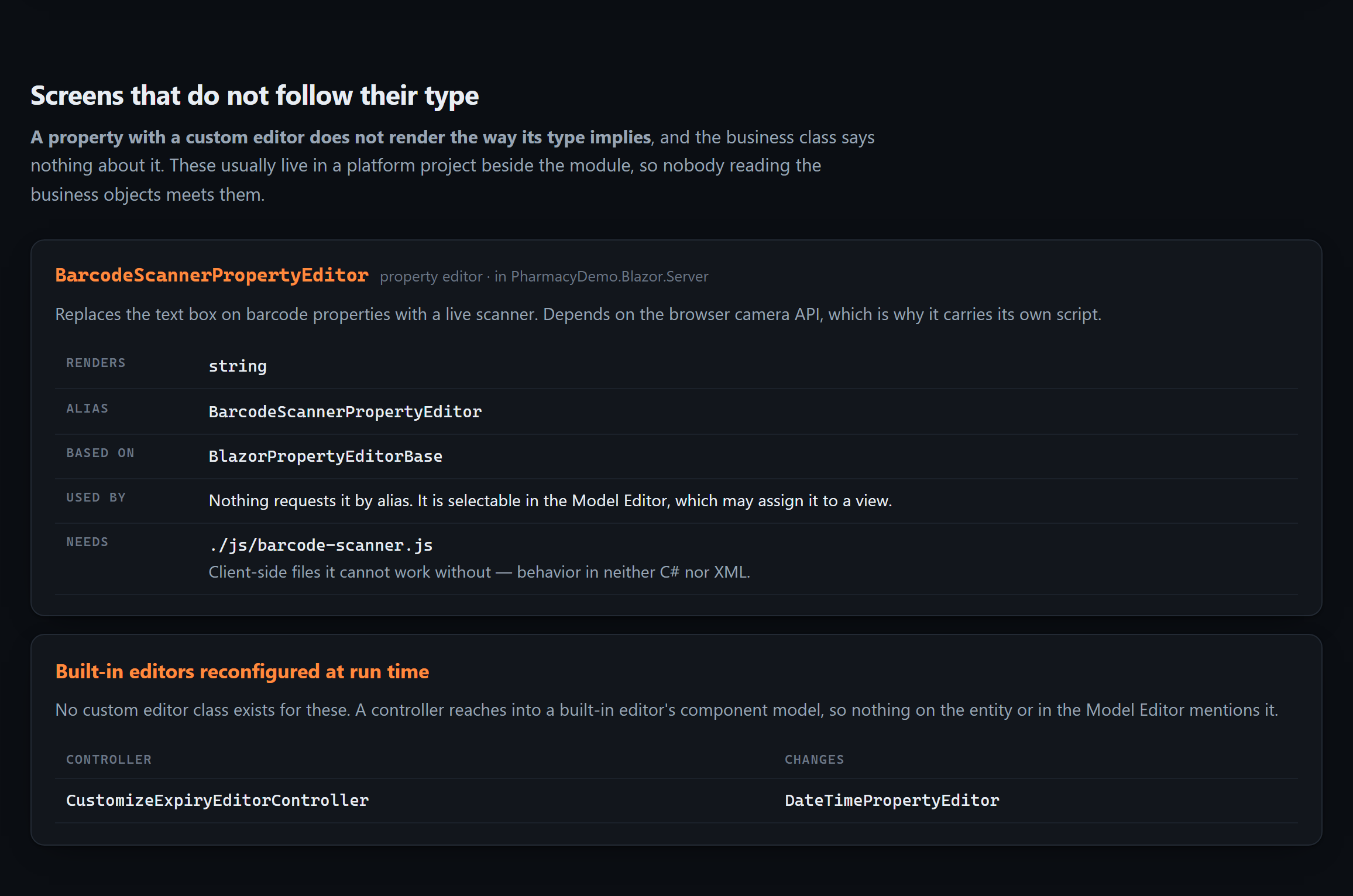
Read from the platform project. The alias constant is declared in the module, so the tool resolves constants across the whole solution — reading either project alone resolves nothing.
There's a subtlety here that the DevExpress documentation settled for me, and it changed the design. Registering an editor with isDefault: true replaces the default for that type everywhere; false merely makes it selectable in the Model Editor. My first version ignored the distinction and cheerfully reported that six entities "use the barcode scanner" because they had string properties. That was plainly false. Now only true links an editor to entities by type.
The JavaScript an editor cannot work without. A map, a signature pad, a scanner: the C# is a shell and the behaviour is in wwwroot/js/. It's in neither C# nor XML, and it's the reason a control silently breaks when somebody renames a file. The tool records those assets as part of the editor.
Built-in editors reconfigured at run time. This one has no custom class to find at all. A controller reaches into a built-in editor's component model through View.CustomizeViewItemControl<T>() and changes how it behaves. Nothing on the entity mentions it. Nothing in the Model Editor mentions it. You find it by reading controllers, which is exactly what nobody does when they're trying to understand a domain.
Migrations that ran once. This is my favourite, because it's the one that makes agents invent history. Every XAF team has an updater full of blocks like this:
if (CurrentDBVersion < new Version("1.1.0.0") && CurrentDBVersion > new Version("0.0.0.0")) {
    BackfillPrescriptionExpiry();
}
That ran once, on somebody's production database, three years ago, and never again. Reading the code that runs today cannot recover what it did. So when someone asks "why do the 2023 rows have that value?", an agent reasons from current code and confidently invents a cause.
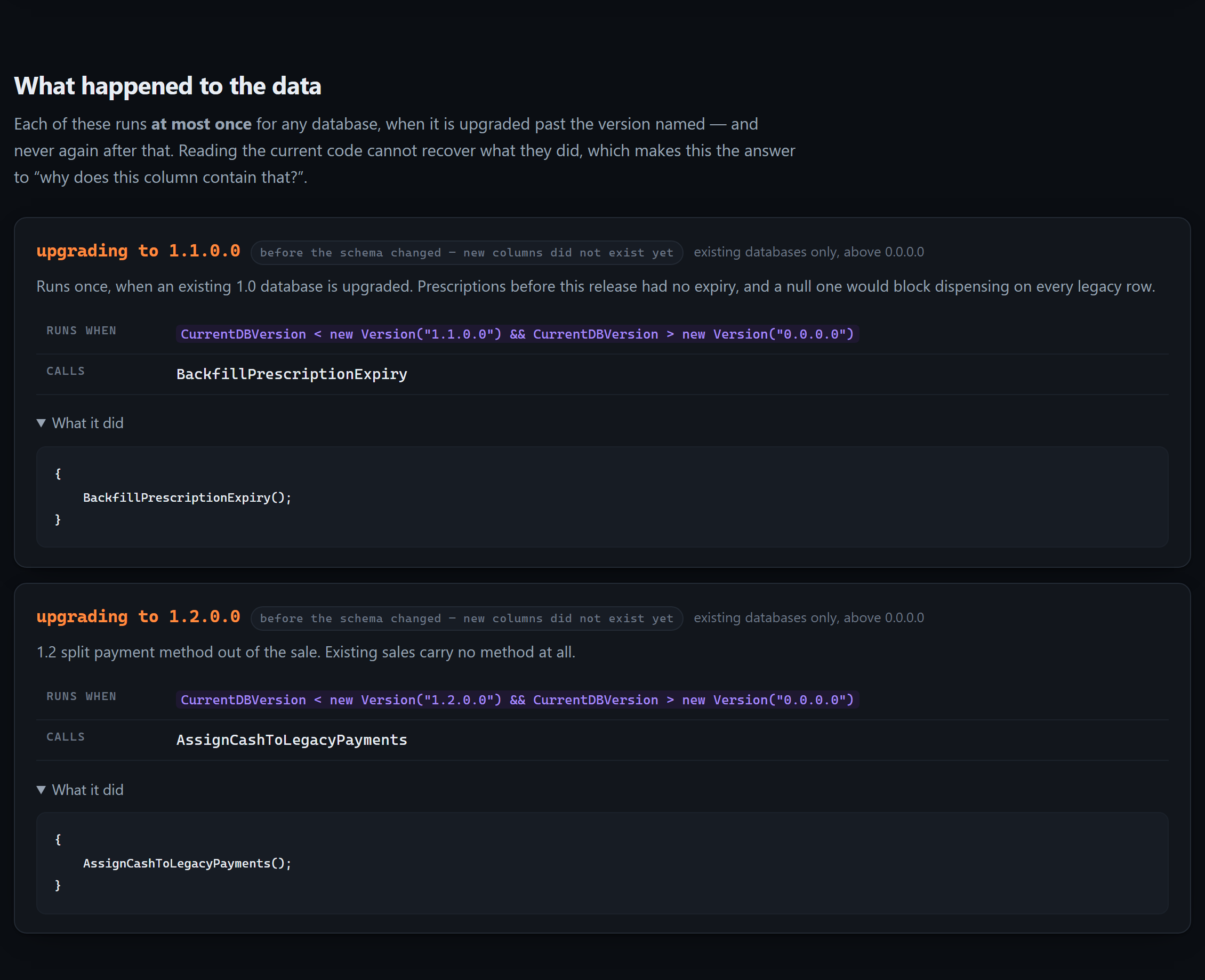
The tool records which version it upgraded to, the "existing databases only" lower bound, which schema phase it ran in — a block running before the schema changed could not touch the new columns — the methods it calls, the code itself, and the comment above the block. That comment is usually the only surviving record of why, and why is the question anyone reading a migration actually has.
Seed data is kept strictly separate throughout. Seed data says what a fresh database contains; migrations say what happened to every database that wasn't fresh. Conflating them misreports both.
What runs when you open this screen
That question has no answer anywhere in an XAF repository, and the two halves are missing for different reasons.
The screens are in no file. XAF generates a list, a detail and a lookup view for every business class, plus a list view for every collection, and the Model Editor stores only the ones somebody changed. Grep a solution for Patient_Prescriptions_ListView and you get nothing. It is still a screen your users open every day. The demo application in the repository has fourteen business classes and fifty-four views, none of which appear in any file — the id rules come from XAF's own node generators, so the inventory can be derived rather than guessed.
Which controllers run there is decided at run time. ViewController.IsFitToView ANDs four conditions together: nesting, view type, object type and view id. Every one of them is unrestricted when unset — so a controller that sets none loads onto every screen in the application, and almost nobody knows which of theirs do. The object-type test is IsAssignableFrom, not equality, so targeting a base class quietly reaches every class beneath it.
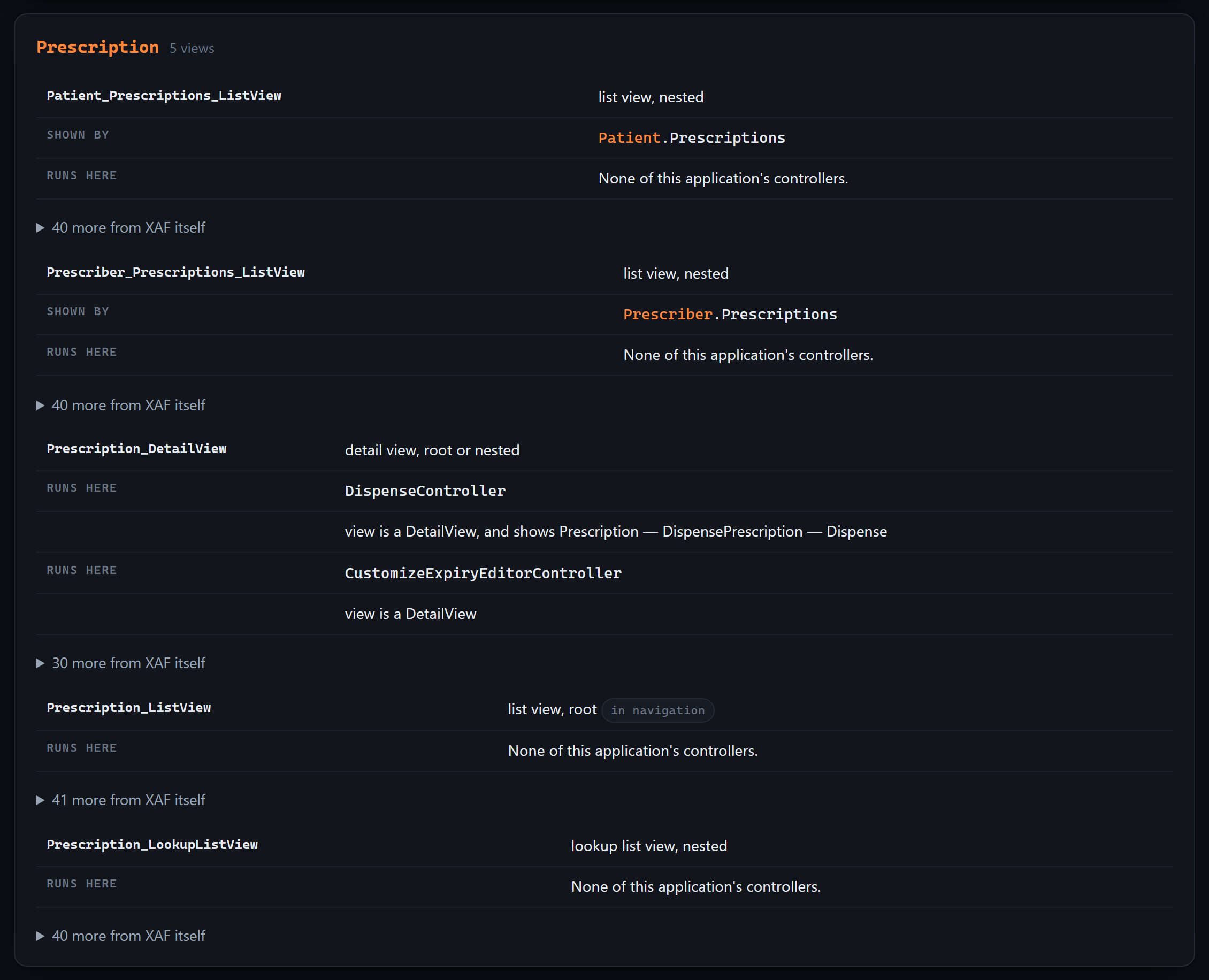
The tool evaluates all four the way the framework does, and records why each one matched, so the answer can be checked instead of trusted. On the very first run against the demo it found what I built it to find: a ViewController<DetailView> that names no object type, so it loads onto the detail view of all fourteen classes. Its own comment says it customizes "every expiry field".
Two layers, kept apart. What your team wrote gets the full treatment; what XAF provides is folded behind one line — there is a great deal of it, and it is not yours to change. That distinction turns out to be the whole point when somebody asks you to change what a screen does.
And what it refuses to claim matters as much. A controller listed there can still switch itself off through Active["reason"], which depends on the data and the user. This is what XAF loads onto a screen, not what will necessarily do something — and anything unreadable from source is listed apart, with the reason, rather than quietly counted as "runs everywhere".
The decision everything else rests on
Extraction is Roslyn syntax analysis. The tool parses your source as text. It never compiles your project, and it never references a DevExpress assembly.
That sounds like a limitation. It's the feature the whole project stands on:
- It works on a branch that doesn't build — which is often precisely when you need to know what the application does.
- It needs no DevExpress licence. Contributors without a subscription can work on the extractor, and CI runs free on a public Ubuntu runner. The test suite is 270 tests over synthetic XAF fixtures that reference DevExpress types which are never installed, because nothing is ever compiled.
- It's fast. Roslyn parsing over a large module takes seconds, not a build.
The cost is that reflection-only truths are unavailable. I judged that a good trade, and three years of production use hasn't changed my mind.
Why most of the documentation is not in AGENTS.md
AGENTS.md is prepended to every request an agent makes in that repository. Its size is a tax paid on every question, forever. Putting 70 KB of entity detail there would crowd out the user's actual question.
So the output is tiered: an ~11 KB index that's always loaded, and ~70 KB of detail in .xaflogic/ that gets opened only when a question needs it.
The most valuable part is the smallest one. The index opens with ground rules: that this application uses XPO and never EF Core, so those APIs don't exist here; that the inventories are complete, so anything absent genuinely does not exist; and that some behaviour lives in the Model Editor rather than in C#. Those few paragraphs stop most of the confident invention.
The closed-world statement is the one that earns its place. It converts absence of evidence into evidence of absence, and it's why the useful answer is this one:
There is no entity called PurchaseOrder in this application. This is the complete list of 19 entities, extracted from the whole source tree: …
The same extraction, for a human
Agents aren't the only readers. xaflogic explain writes one self-contained HTML page for the person who has just inherited a ten-year-old XAF application, or has to hand one over. No server, no build step, no network request — it opens from an email attachment on a machine with no internet, which is how handovers actually happen.
Its centrepiece is a map of your domain model, drawn from the association attributes scattered across twenty files. Most teams have never seen theirs. It exists in one person's head, which is exactly the knowledge that leaves when they do.
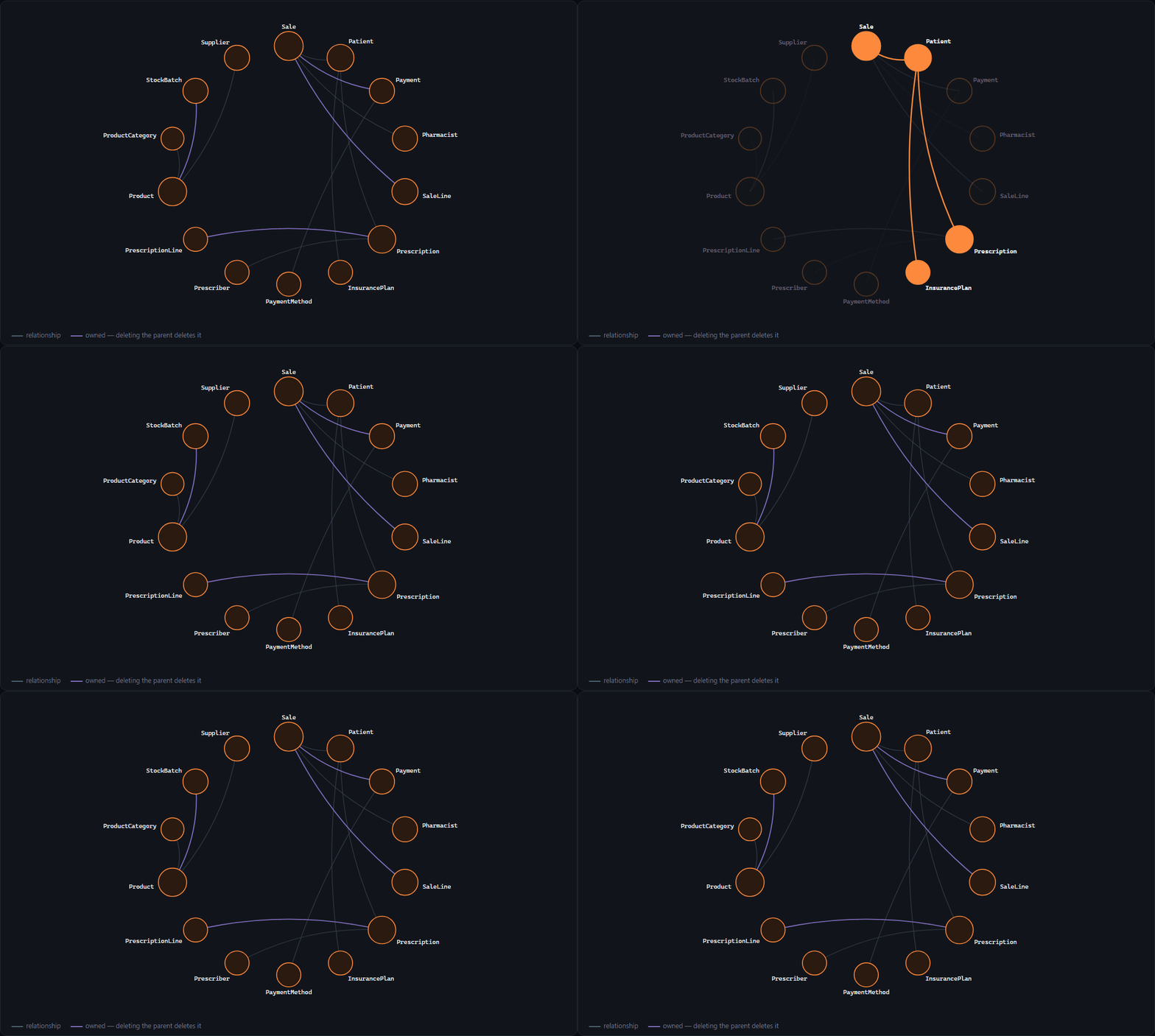
Hover an entity and everything it doesn't touch fades. Orange means deleting the parent deletes the child.
The layout is computed at generation time rather than in the browser, so the same source always draws the same diagram and a regenerated page produces a readable diff.
The tool caught me lying
Here's the part I'd rather not write, and the reason I'm writing it.
The repository ships a synthetic demo application so the diagrams and screenshots show something realistic that belongs to no client. While taking screenshots for the site, I noticed the entity cards were oddly bare. The demo wrote its XAF attributes on the backing fields instead of on the properties — and that is not how XPO is written. DevExpress's own persistent classes attribute the property; the analyzer reads the property.
The demo had been quietly reporting 12 relationships when it declares 24, and 5 rules when it has 9. For weeks, the map, the README and the website all rendered an application half as rich as the one in the repository. Every test passed, because no test pinned the demo's shape.
Then, listing the project on an MCP directory, I saw the page advertising v0.9.0, 7 tools and 129 tests. The real numbers were 0.11.0, 9 and 176. The README's Status section had frozen months earlier, and NuGet, the MCP registry and every directory that mirrors a README were all repeating it.
Both are the same failure, and it's the one this tool exists to attack: a statement about a codebase that nothing forces to stay true. So now a test asserts the demo's shape, and another derives the version, the tool count and the test count from the source and fails the build when the README drifts. If a closed-world inventory is worth generating for your code, it's worth enforcing on my own documentation.
Then I audited it properly, and it was worse
Two accidents in one week is a pattern, not bad luck. So before tagging this release I ran three reviewers over the project on deliberately disjoint axes: one checking every claim against the installed DevExpress sources, one hunting defects in the code, and one that was shown only the generated output and never the generator.
The third found a category the other two structurally could not. It read the artefacts the way somebody who had just inherited the app would, and reported sentences that were simply false: two of my generators contradicting each other about whether a custom editor was requested by anything; a recipe telling an agent to register new business classes in a collection XAF does not require; a migration range naming as its lower bound the one version it excludes. Reading code makes you read your own intent. Reading output makes you read what it says.
The worst finding came from the second reviewer, and it had been there far longer than the release. Extraction returned only the first controller class per file, and only recognised classes deriving directly from ViewController and its two siblings. Real XAF code does not look like that — it extends shipped controllers and its own base classes — so a probe with five controllers across three files reported one. Every test passed, because every test built its input by hand. And a controller that is never seen cannot be reported as missing, which is the one failure a tool built on closed-world inventories cannot survive.
Around thirty findings, one false alarm. The corrections split cleanly, and the split is worth naming because it is the whole discipline:
- Over-reporting — saying more than the source proves. A ternary on
TargetViewTyperead as a confident restriction to whatever word came last. A controller extending a class the analysis cannot see reported as "restricts nothing, runs everywhere". A base controller listed on screens where a registered descendant had already switched it off. Every one of these is a definite statement built out of not having understood a line. - False completeness — a list headed every expression in this application that drew from four of the six places criteria occur, while deduplicating. The two it never touched were the expression a
RuleCriteriaactually enforces and the criteria deciding whether an action's button can be pressed at all. On the demo that isNot IsDispensed: the condition governing the application's single operation, in no generated document.
The rule I settled on: under-reporting is bad, over-reporting is worse, and "unknown" must never be spelled the same way as "unrestricted". When the tool cannot read something now, it says so and names the expression it could not resolve, instead of quietly filing it under "no restriction".
I would rather publish that list than a launch post. A tool whose entire pitch is stop your agent inventing things has no business shipping documentation nobody checks.
Where it is
MIT, on GitHub: peopleworks/XAFLogicExplainer. Three NuGet packages, an MCP server in the official registry, and a Claude Code plugin:
/plugin marketplace add peopleworks/XAFLogicExplainer
/plugin install xaf-logic-explainer@peopleworks-xaf
There's a walkthrough site with the diagrams and real output.
It's deliberately still 0.x. The extraction engine is production-proven — it runs against real XAF applications — but 1.0.0 is earned once the extractor has read codebases I didn't write. Which is the ask: point it at your XAF application, and when it misreads a pattern yours uses, open an extraction gap issue. A misread pattern plus a fixture is usually the whole fix, and the regression can never come back quietly.
Your agent already knows XAF. Let's teach it your application.