business intelligence · claude code embedded

Bring your Claude subscription and build dashboards on any database.

i360 is the dashboard editor with Claude Code living inside: a panel with the assistant you already use, wired to 106 tools that build the dashboard live. You talk; it queries your data, assembles the KPIs, charts and filters — then looks at its own work and fixes it.

No Claude subscription? No problem: the PeopleWorks plan brings the intelligence.

106
tools
6
data sources
2
ways to pay
103
shared with Copilot

private by design

Claude directs. i360 does the work on your PC.

We don't hand your database to the AI. Claude understands your question, decides which tools to use and in what order, and coordinates their execution. Queries, calculations, the dashboard, the Excel workbook and the PowerPoint deck are built by i360 on your machine, against your database.

  1. You ask“How are we doing against target by branch?”
  2. Claude plansIt picks the tools and the order: query, calculate, build, review.
  3. i360 runs it on your PCIt queries your database read-only, calculates with your database and the DevExpress engine, and builds the dashboard.
  4. You get the resultA live dashboard, with your numbers calculated by your database, not by the model.

What stays with you

  • Your database and your complete files.
  • Your credentials: encrypted on your PC; they never go through the chat.
  • The calculations: done by your database and the DevExpress engine, on your machine.
  • Your dashboards, your Excel workbooks and your decks.

The only things Claude receives

  • Your question.
  • The structure of your data (tables and columns), when needed.
  • Totals and aggregates to answer. With Private Mode (on by default) not a single row of your data reaches it: previews, samples and filters are shown only to you, inside i360.
  • A screenshot of the dashboard it builds, so it can check its own work — only if you turn Private Mode off.

With your own subscription, that conversation goes straight from your PC to Claude: PeopleWorks never sees it. Private Mode is on by default; if you want Claude to see samples and the screenshot to fine-tune the design, turn it off with one click (and back on whenever you like).

Your data, wherever it lives

i360 connects to the database you already have — or to the XML cube your ERP produces — and the assistant learns its structure on its own: roles, aggregations, even your business rules.

SQL Server MySQL/MariaDB PostgreSQL SQLite OleDb / Access ERP XML direct SQL queries

your data, with meaning

We help document your data and build its dictionary.

Describe what each column means, how to interpret it and how it should be calculated. i360 helps you prepare a data dictionary —descriptions, roles, aggregations and formats— so the AI can better understand the information and work with your business context.

How to explain a data field

Example using the Distribuidora Caribe demo columns. The dictionary preserves the original column names.

ColumnMeaningHow to use it
VentasSale amount after the discount.Measure · sum · RD$ format
SucursalBranch where the sale takes place.Dimension for grouping and comparison
FechaDate of the sale.Time axis for trends

Context you can review and reuse

Schema analysis suggests roles, aggregations and visualizations. You complete or correct the descriptions and teach business rules; the assistant uses this context when querying and building.

Schema profiles let you save and distribute that dictionary for XML files with the same column structure. You can also generate dashboard documentation to explain its sources, metrics and filters.

The person validates the meaning. A clear description helps prevent the AI from confusing a measure, date or category.

Three steps and you're building

No API keys to paste, no folder setup, no permission prompts. i360 prepares the whole Claude environment by itself.

STEP 01

Bring your Claude

Install Claude Code with your subscription — the one you already use every day. Don't have one? The PeopleWorks plan brings the intelligence and you just paste a token.

STEP 02

Open i360 and hit “Claude”

The ribbon button (Ctrl+Shift+K) opens the Dashboard Expert panel, already connected to your data and to the editor's 106 tools.

STEP 03

Ask for your dashboard

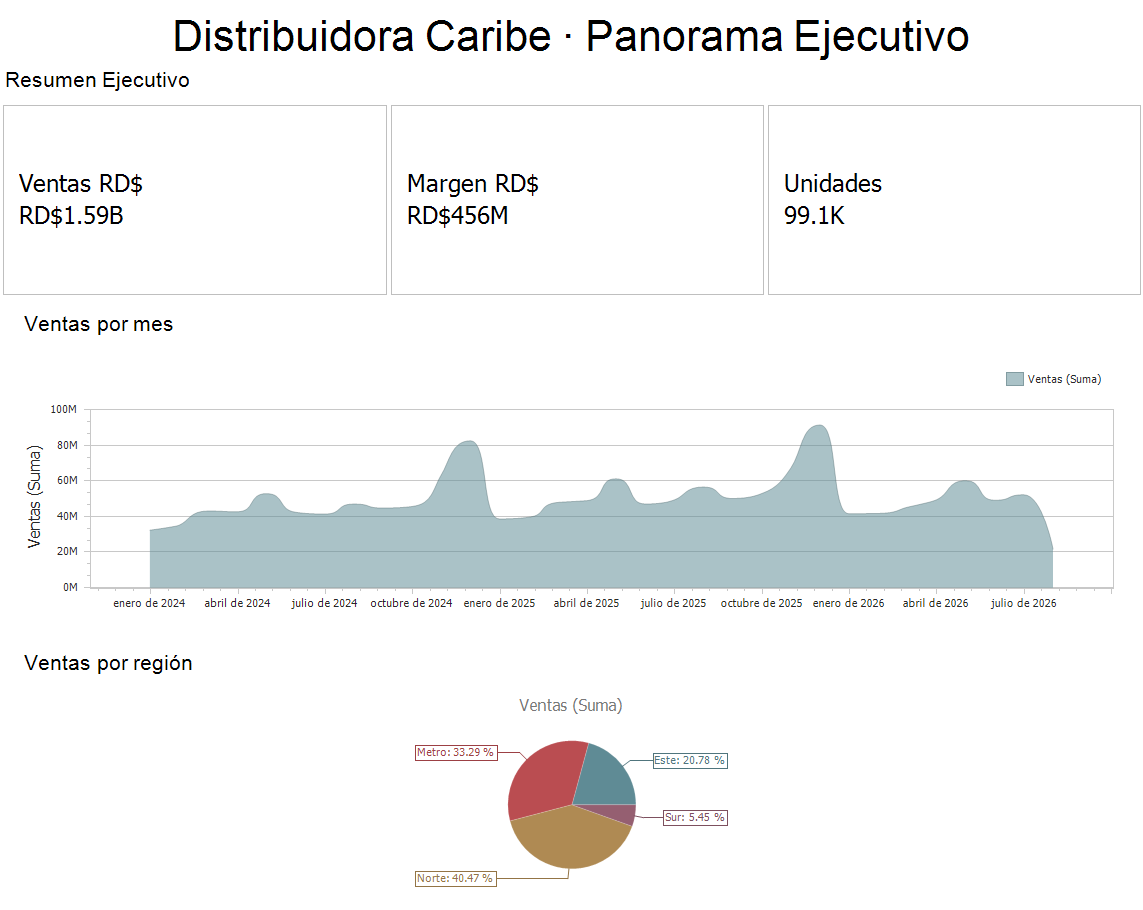
“Build me an executive sales dashboard.” It analyzes, builds, reviews its own work and tells you when it's ready to save. You always have the final word.

under the hood, no smoke

Zero-config for real:
i360 writes this for you.

When you hit “Claude”, the editor prepares everything itself: the tool bridge, the Expert's profile and — on the PeopleWorks plan — the platform connection. You never touch a file. This is the only one you could touch, and it's this short:

asistente.json %LOCALAPPDATA% / i360DashBoardEditor
{  "Backend": "subscription"  // your everyday Claude}
{  "Backend": "relay",  // platform-billed  "RelayUrl": "https://relay.peopleworksservices.com"}

With your own subscription you don't even need this file: i360 detects your claude, prepares the workspace, pre-authorizes its 106 tools and denies the dangerous ones. You open it and ask.

On the PeopleWorks plan, the platform URL in the file and your token configured in i360. The intelligence travels through our gateway — with context caching so every question costs less — and your database and files stay on your machine.


the tools, one by one

One request. A complete workflow.

106 tools for Claude: 103 shared with PeopleWorks Copilot and 3 exclusive to MCP. Connections, SQL, building, analysis, versions and deliverables: available today inside i360.

Available today

Datasource Studio

SQL Server, PostgreSQL, MySQL/MariaDB and SQLite. Choose a saved connection, test access, and explore tables, columns and relations before writing SQL.

list_connections · connect_datasource · test_connection · explore_schema · map_relations

The person enters the password in a secure window; it is stored encrypted with DPAPI. It never passes through chat. The dashboard stores only the connection NAME.

Database read-only

SQL Studio

Write and validate SQL with the engine without executing it. Review a preview together and inspect the estimated plan for optimization. Then profile 2,000 real rows and build the dashboard in one step, first saving a restorable version.

write_query · preview_query · optimize_query · dashboard_from_query

A read-only guard in the program and a read-only or rolled-back transaction. The database is only read; saving a query or a design does not modify its records.

“Sales by branch from my SQL database”

106 Claude · 103 Copilot
Data & analysis28get_dashboard_contextlist_columnssuggest_visualizationget_data_summaryget_visible_metricsget_hints_infolist_available_toolsrefresh_data_sourceget_item_configurationcompare_itemsauto_enhance_schemaget_enhanced_suggestionscreate_schema_profilelist_schema_profilesexport_profiles_bundleget_data_sampleget_summary_statsfind_outliersfind_top_nfilter_by_rangefilter_by_valuecheck_compliancecalculate_totalcalculate_averagecalculate_trendsopen_data_explorerget_dataset_profileget_dashboard_screenshotBuild & design37add_dashboard_itemconfigure_chartremove_itemset_item_titleset_dashboard_titleadd_series_to_chartconfigure_cardenable_master_filterset_chart_typeconfigure_pie_chartset_item_positionset_item_sizeadd_argument_to_chartconfigure_grid_columnsadd_filter_itemclone_itemset_chart_paletteconfigure_gaugeset_item_visibilityadd_textboxadd_calculated_fieldadd_imageconfigure_range_filterset_conditional_formattingconfigure_topnconfigure_tab_containerarrange_items_in_gridadd_drill_downsave_dashboard_templateload_dashboard_templatelist_available_templatesapply_themesuggest_optimal_layoutdashboard_wizardgenerate_dashboardlist_dashboard_templatesapply_dashboard_templateXML & versions8get_dashboard_xml_guideget_dashboard_xmlapply_dashboard_xmlundo_dashboard_xmlsave_dashboard_versionlist_dashboard_versionsrestore_dashboard_versioncompare_dashboard_versionsKnowledge & RAG11add_knowledgelist_knowledgesearch_knowledgedelete_knowledgeseed_knowledge_examplesexport_knowledgesearch_devexpress_docsrag_add_documentrag_list_documentsrag_searchrag_remove_documentOffice & presentations7export_dashboardexport_item_to_imagegenerate_documentationgenerate_powerpointgenerate_excelexport_dashboard_datashow_presentationPerformance & validation5validate_dashboardanalyze_dashboard_performancediagnose_dashboard_performancestart_performance_tracestop_performance_traceDatasource Studio5list_connectionsconnect_datasourcetest_connectionexplore_schemamap_relationsSQL Studio5generate_dashboard_from_querywrite_querypreview_queryoptimize_querydashboard_from_query i360 + Claude from conversation to dashboard
Explore the tools

The trace has finished. Select a dot to see what it does and what to ask your Claude.

0:32 / 0:32
Read the script · accessible transcript
  1. Request: “Sales by branch from my SQL database.”
  2. list_connectionsChooses a saved connection. The password never enters chat.
  3. explore_schemaReads tables, columns and samples to understand the data.
  4. map_relationsChecks how sales and branches join; confirms inferred relations.
  5. write_queryWrites and validates the SELECT with the engine without executing it.
  6. preview_queryShows real rows with limits and a read-only or rolled-back transaction.
  7. dashboard_from_queryAnalyzes 2,000 real rows and builds the board after saving a restorable version.
  8. get_dashboard_screenshotThe eyes: inspects the result and notices an unclear title.
  9. set_item_titleCorrects the title to “Sales by branch”.
  10. save_dashboard_versionSaves a design version in the history.
  11. Now explore: every dot is a real tool.

The complete catalog · 106 tools

READ retrieves information. WRITE changes the editor, configuration or a file; it never means permission to write to the SQL database. MCP-only tools are marked.

Type a tool name while the selector is focused to find it. Selecting filters the list even without JavaScript. Open any row to read its card.

106 tools available

Data & analysis · 28

auto_enhance_schemaWRITE
WRITE

Analyzes data and updates semantic hints for roles, aggregations, formats and visualizations.

Ask your Claude:«Detect measures, dimensions and dates in my data.»

Shared catalog · Copilot and Claude

calculate_averageREAD
READ

Computes averages, median, deviation, percentiles and distribution, optionally grouped.

Ask your Claude:«Calculate average order value by branch.»

Shared catalog · Copilot and Claude

calculate_totalREAD
READ

Calculates a column sum, optionally grouped, with each group's share.

Ask your Claude:«Calculate sales by region.»

Shared catalog · Copilot and Claude

calculate_trendsREAD
READ

Analyzes time trends, changes and periods of growth or decline.

Ask your Claude:«How do sales change month by month?»

Shared catalog · Copilot and Claude

check_complianceREAD
READ

Finds records that violate a threshold, with counts and deviation statistics.

Ask your Claude:«Which sales fell below target?»

Shared catalog · Copilot and Claude

compare_itemsREAD
READ

Compares two items' bindings, visual settings, layout and interaction.

Ask your Claude:«Compare these two charts.»

Shared catalog · Copilot and Claude

create_schema_profileWRITE
WRITE

Creates a reusable schema profile matched by column fingerprint for similarly structured XML datasets.

Ask your Claude:«Create a reusable profile for this XML.»

Shared catalog · Copilot and Claude

export_profiles_bundleWRITE
WRITE

Exports schema profiles as a JSON bundle for other installations.

Ask your Claude:«Export the profiles for my customers.»

Shared catalog · Copilot and Claude

filter_by_rangeREAD
READ

Returns records in a numeric or date range and subset statistics.

Ask your Claude:«Show me last quarter's sales.»

Shared catalog · Copilot and Claude

filter_by_valueREAD
READ

Searches text values with partial, case-insensitive matching and summarizes the subset.

Ask your Claude:«Find records for the North branch.»

Shared catalog · Copilot and Claude

find_outliersREAD
READ

Detects outliers with the IQR method and returns the affected rows.

Ask your Claude:«Find unusual sales.»

Shared catalog · Copilot and Claude

find_top_nREAD
READ

Finds highest or lowest N records with subset statistics and share of total.

Ask your Claude:«Who are the top customers?»

Shared catalog · Copilot and Claude

get_dashboard_contextREAD
READ

Reads the current dashboard structure, items, data sources and available database hints.

Ask your Claude:«What is in this dashboard?»

Shared catalog · Copilot and Claude

get_dashboard_screenshotREAD
READ

Captures the dashboard as the person sees it so Claude can inspect its work. MCP only.

Ask your Claude:«Look at the dashboard and check titles and contrast.»

Claude exclusive · MCP

get_data_sampleREAD
READ

Reads real sample rows, extremes and per-column statistics.

Ask your Claude:«Show me real samples from this data.»

Shared catalog · Copilot and Claude

get_data_summaryREAD
READ

Summarizes item counts, visualization types and active master filters.

Ask your Claude:«Summarize this board's structure.»

Shared catalog · Copilot and Claude

get_dataset_profileREAD
READ

Reads the full dataset profile: roles, distributions, monthly series, nulls, concentration and outlier insights.

Ask your Claude:«Give me a tour of the dataset.»

Shared catalog · Copilot and Claude

get_enhanced_suggestionsREAD
READ

Suggests charts, KPIs and filters using previously enhanced schema hints.

Ask your Claude:«What should we build with this data?»

Shared catalog · Copilot and Claude

get_hints_infoREAD
READ

Explains the available database hints and how to configure them.

Ask your Claude:«Explain my data hints.»

Shared catalog · Copilot and Claude

get_item_configurationREAD
READ

Reads an individual item's detailed configuration.

Ask your Claude:«How is this KPI configured?»

Shared catalog · Copilot and Claude

get_summary_statsREAD
READ

Computes minima, maxima, means, sums, distinct values, nulls and text frequencies.

Ask your Claude:«Summarize statistics for every column.»

Shared catalog · Copilot and Claude

get_visible_metricsREAD
READ

Lists visible measures and their aggregation settings.

Ask your Claude:«Which metrics are visible?»

Shared catalog · Copilot and Claude

list_available_toolsREAD
READ

Lists the shared Copilot tool catalog and usage examples.

Ask your Claude:«Which tools does Copilot have?»

Shared catalog · Copilot and Claude

list_columnsREAD
READ

Lists available columns, descriptions, types, roles and aggregations.

Ask your Claude:«Show me the columns and their roles.»

Shared catalog · Copilot and Claude

list_schema_profilesREAD
READ

Lists schema profiles with fingerprints, columns, usage and dates.

Ask your Claude:«Show me the schema profiles.»

Shared catalog · Copilot and Claude

open_data_explorerWRITE
WRITE

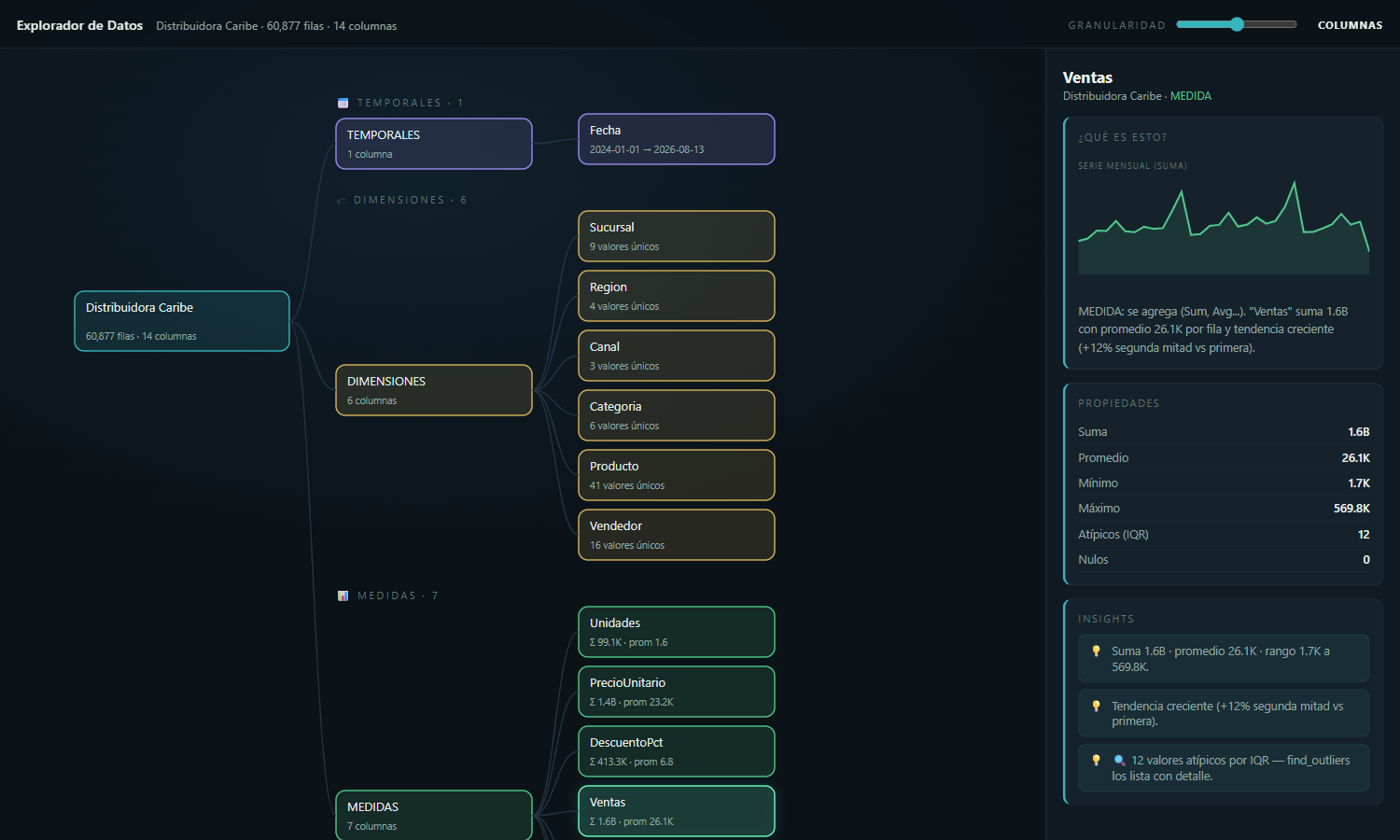
Opens a navigable data graph with roles, granularity, statistics, charts and automatic insights.

Ask your Claude:«Open the explorer for this data.»

Shared catalog · Copilot and Claude

refresh_data_sourceWRITE
WRITE

Reloads the dashboard's data sources into the editor; does not modify the database.

Ask your Claude:«Refresh the board's data.»

Shared catalog · Copilot and Claude

suggest_visualizationREAD
READ

Recommends a visualization for a column using its semantic hints.

Ask your Claude:«Which chart suits Sales?»

Shared catalog · Copilot and Claude

Build & design · 37

add_argument_to_chartWRITE
WRITE

Adds a dimension argument to an existing chart.

Ask your Claude:«Group that chart by region.»

Shared catalog · Copilot and Claude

add_calculated_fieldWRITE
WRITE

Adds a calculated field to a dashboard data source.

Ask your Claude:«Create a percentage margin field.»

Shared catalog · Copilot and Claude

add_dashboard_itemWRITE
WRITE

Adds a chart, card, grid, pie, gauge or pivot item.

Ask your Claude:«Add a sales card.»

Shared catalog · Copilot and Claude

add_drill_downWRITE
WRITE

Configures hierarchical navigation for charts and pies.

Ask your Claude:«Allow navigation from region to branch.»

Shared catalog · Copilot and Claude

add_filter_itemWRITE
WRITE

Adds an interactive ComboBox or ListBox filter.

Ask your Claude:«Add a region filter.»

Shared catalog · Copilot and Claude

add_imageWRITE
WRITE

Adds an image from a local file or URL to the dashboard.

Ask your Claude:«Add the company logo.»

Shared catalog · Copilot and Claude

add_series_to_chartWRITE
WRITE

Adds a measure series with a specified aggregation to an existing chart.

Ask your Claude:«Add margin as the second series.»

Shared catalog · Copilot and Claude

add_textboxWRITE
WRITE

Adds a text box for annotations or titles.

Ask your Claude:«Add a note about the Christmas season.»

Shared catalog · Copilot and Claude

apply_dashboard_templateWRITE
WRITE

Replaces the current dashboard items with the selected built-in template.

Ask your Claude:«Apply the Executive template to the board.»

Shared catalog · Copilot and Claude

apply_themeWRITE
WRITE

Applies a predefined Corporate, Modern, Classic, Dark or Light dashboard theme.

Ask your Claude:«Apply the Corporate theme.»

Shared catalog · Copilot and Claude

arrange_items_in_gridWRITE
WRITE

Arranges dashboard items automatically in an optimized grid.

Ask your Claude:«Arrange the board in a grid.»

Shared catalog · Copilot and Claude

clone_itemWRITE
WRITE

Duplicates an item with all its settings.

Ask your Claude:«Duplicate this KPI for margin.»

Shared catalog · Copilot and Claude

configure_cardWRITE
WRITE

Configures a KPI card with its value, optional target and delta.

Ask your Claude:«Configure the sales KPI with its target.»

Shared catalog · Copilot and Claude

configure_chartWRITE
WRITE

Binds measures and dimensions to a chart with appropriate aggregations.

Ask your Claude:«Configure sales by branch as bars.»

Shared catalog · Copilot and Claude

configure_gaugeWRITE
WRITE

Configures a gauge with a value, scale and optional target.

Ask your Claude:«Create a progress gauge for the target.»

Shared catalog · Copilot and Claude

configure_grid_columnsWRITE
WRITE

Configures the visible columns and widths of a grid.

Ask your Claude:«Show date, branch and sales in the detail grid.»

Shared catalog · Copilot and Claude

configure_pie_chartWRITE
WRITE

Configures pie values, categories and aggregation.

Ask your Claude:«Make the sales by category pie chart.»

Shared catalog · Copilot and Claude

configure_range_filterWRITE
WRITE

Configures a numeric or time range slider filter.

Ask your Claude:«Add a sales period range selector.»

Shared catalog · Copilot and Claude

configure_tab_containerWRITE
WRITE

Creates a tab container to organize dashboard items.

Ask your Claude:«Organize the board into Summary and Detail tabs.»

Shared catalog · Copilot and Claude

configure_topnWRITE
WRITE

Limits an item to the highest or lowest N values.

Ask your Claude:«Show the ten best-selling products.»

Shared catalog · Copilot and Claude

dashboard_wizardWRITE
WRITE

Guides dashboard creation through template, metrics, dimensions, filters, theme, preview and generation.

Ask your Claude:«Guide me through building the board.»

Shared catalog · Copilot and Claude

enable_master_filterWRITE
WRITE

Enables or disables an item's ability to filter other items.

Ask your Claude:«Make a branch click filter the whole board.»

Shared catalog · Copilot and Claude

generate_dashboardWRITE
WRITE

Analyzes the current data and creates a complete dashboard with KPIs, trends, categories, filters and detail.

Ask your Claude:«Create an executive sales dashboard.»

Shared catalog · Copilot and Claude

list_available_templatesREAD
READ

Lists previously saved dashboard templates.

Ask your Claude:«Which saved templates do I have?»

Shared catalog · Copilot and Claude

list_dashboard_templatesREAD
READ

Lists built-in Executive, Sales, Financial, Inventory, Operational, Comparison and Trend templates.

Ask your Claude:«Which built-in templates are available?»

Shared catalog · Copilot and Claude

load_dashboard_templateWRITE
WRITE

Loads a saved template, optionally merging with the current design.

Ask your Claude:«Load my sales template.»

Shared catalog · Copilot and Claude

remove_itemWRITE
WRITE

Removes an item by name from the current design.

Ask your Claude:«Remove the duplicate chart.»

Shared catalog · Copilot and Claude

save_dashboard_templateWRITE
WRITE

Saves the current dashboard as a reusable template.

Ask your Claude:«Save this design as a sales template.»

Shared catalog · Copilot and Claude

set_chart_paletteWRITE
WRITE

Changes the color palette. In DevExpress the palette belongs to the whole dashboard: it recolors every chart, pie and map; Ctrl+Z undoes it.

Ask your Claude:«Switch to the high-contrast palette.»

Shared catalog · Copilot and Claude

set_chart_typeWRITE
WRITE

Changes an existing chart's series type, such as bar, line or area.

Ask your Claude:«Change the trend to a line chart.»

Shared catalog · Copilot and Claude

set_conditional_formattingWRITE
WRITE

Applies value-based conditional formatting to grids and pivots.

Ask your Claude:«Highlight sales below target.»

Shared catalog · Copilot and Claude

set_dashboard_titleWRITE
WRITE

Changes the main dashboard title and its visibility.

Ask your Claude:«Title the board Executive sales.»

Shared catalog · Copilot and Claude

set_item_positionWRITE
WRITE

Moves an item within the dashboard layout.

Ask your Claude:«Place the trend below the KPIs.»

Shared catalog · Copilot and Claude

set_item_sizeWRITE
WRITE

Changes an item's span in the layout.

Ask your Claude:«Give the branch chart more width.»

Shared catalog · Copilot and Claude

set_item_titleWRITE
WRITE

Changes an item's title and can show or hide it.

Ask your Claude:«Change the title to Sales by branch.»

Shared catalog · Copilot and Claude

set_item_visibilityWRITE
WRITE

Shows or hides an item without removing it.

Ask your Claude:«Hide the detail grid for now.»

Shared catalog · Copilot and Claude

suggest_optimal_layoutREAD
READ

Recommends a layout with KPIs above charts and details.

Ask your Claude:«Suggest a better arrangement for the items.»

Shared catalog · Copilot and Claude

XML & versions · 8

apply_dashboard_xmlWRITE
WRITE

Validates edited XML with DevExpress, preserves live data sources and stores an undo backup before applying.

Ask your Claude:«Apply this XML design and preserve my data.»

Shared catalog · Copilot and Claude

compare_dashboard_versionsREAD
READ

Compares titles, added, removed or changed items and layout across versions.

Ask your Claude:«What changed since the previous version?»

Shared catalog · Copilot and Claude

get_dashboard_xmlREAD
READ

Reads the current dashboard XML with protected data sources omitted.

Ask your Claude:«Show me the design XML.»

Shared catalog · Copilot and Claude

get_dashboard_xml_guideREAD
READ

Reads the production XML guide, common errors and safe editing procedure.

Ask your Claude:«Read the guide before editing XML.»

Shared catalog · Copilot and Claude

list_dashboard_versionsREAD
READ

Lists historical design versions, dates, origins, labels and summaries.

Ask your Claude:«Which dashboard versions do I have?»

Shared catalog · Copilot and Claude

restore_dashboard_versionWRITE
WRITE

Validates and restores a version in the editor, first saving the current state and reconnecting live data.

Ask your Claude:«Return to yesterday's version.»

Shared catalog · Copilot and Claude

save_dashboard_versionWRITE
WRITE

Saves a labeled, restorable design version in the history.

Ask your Claude:«Save a version before changing the design.»

Shared catalog · Copilot and Claude

undo_dashboard_xmlWRITE
WRITE

Restores the design before the last XML edit; repeating the call redoes it.

Ask your Claude:«Undo the last XML edit.»

Shared catalog · Copilot and Claude

Knowledge & RAG · 11

add_knowledgeWRITE
WRITE

Saves a business rule in the knowledge base for subsequent conversations.

Ask your Claude:«Remember that amounts are displayed in RD$.»

Shared catalog · Copilot and Claude

delete_knowledgeWRITE
WRITE

Removes a knowledge-base entry by ID.

Ask your Claude:«Remove the rule that no longer applies.»

Shared catalog · Copilot and Claude

export_knowledgeWRITE
WRITE

Exports the complete knowledge base as JSON for sharing or backup.

Ask your Claude:«Export my rules for another installation.»

Shared catalog · Copilot and Claude

list_knowledgeREAD
READ

Lists business knowledge entries, categories, priorities and usage.

Ask your Claude:«Which business rules have you saved?»

Shared catalog · Copilot and Claude

rag_add_documentWRITE
WRITE

Indexes business documents or folders in the local SQLite retrieval library and updates changed files.

Ask your Claude:«Index the sales policy manual.»

Shared catalog · Copilot and Claude

rag_list_documentsREAD
READ

Lists indexed documents with fragment counts and dates.

Ask your Claude:«Which documents are in the library?»

Shared catalog · Copilot and Claude

rag_remove_documentWRITE
WRITE

Removes a document from the retrieval index without deleting the original file.

Ask your Claude:«Remove the old manual from the library.»

Shared catalog · Copilot and Claude

rag_searchREAD
READ

Retrieves ranked business-document passages locally; answers should cite the source document.

Ask your Claude:«What does the manual say about discounts? Cite the source.»

Shared catalog · Copilot and Claude

search_devexpress_docsREAD
READ

Searches the official DevExpress Dashboard WinForms documentation (needs the DevExpress documentation MCP server configured; it says so if it is not).

Ask your Claude:«Find how to configure a treemap in DevExpress.»

Shared catalog · Copilot and Claude

search_knowledgeREAD
READ

Finds relevant business rules by keywords, tags or related columns.

Ask your Claude:«Find the minimum sales rule.»

Shared catalog · Copilot and Claude

seed_knowledge_examplesWRITE
WRITE

Loads sample currency, sales threshold, seasonal and regional knowledge.

Ask your Claude:«Load the sample business rules.»

Shared catalog · Copilot and Claude

Office & presentations · 7

export_dashboardWRITE
WRITE

Exports the current dashboard to Excel in the requested format.

Ask your Claude:«Export the board to Excel.»

Shared catalog · Copilot and Claude

export_dashboard_dataWRITE
WRITE

Exports the complete real dashboard dataset for analysis or presentations. MCP only.

Ask your Claude:«Export the complete data for a presentation.»

Claude exclusive · MCP

export_item_to_imageWRITE
WRITE

Exports a dashboard item as a PNG, JPG or BMP image.

Ask your Claude:«Export the branch chart as PNG.»

Shared catalog · Copilot and Claude

generate_documentationWRITE
WRITE

Writes dashboard documentation covering items, data sources, filters and metrics to Documents.

Ask your Claude:«Document this dashboard.»

Shared catalog · Copilot and Claude

generate_excelWRITE
WRITE

Creates and opens an Excel workbook with live data, KPIs, summaries, native charts and a pivot table.

Ask your Claude:«Send the data to Excel for analysis.»

Shared catalog · Copilot and Claude

generate_powerpointWRITE
WRITE

Creates and opens an editable PowerPoint with live data, charts, numeric findings and recommendations.

Ask your Claude:«Prepare the sales meeting presentation.»

Shared catalog · Copilot and Claude

show_presentationWRITE
WRITE

Shows a generated presentation in the i360 viewer or browser. MCP only.

Ask your Claude:«Show the presentation in the i360 viewer.»

Claude exclusive · MCP

Performance & validation · 5

analyze_dashboard_performanceREAD
READ

Scores static dashboard complexity and suggests improvements.

Ask your Claude:«Assess this board's complexity.»

Shared catalog · Copilot and Claude

diagnose_dashboard_performanceREAD
READ

Reloads real DevExpress data while measuring query, row, aggregation and filter timings.

Ask your Claude:«Why is this dashboard slow?»

Shared catalog · Copilot and Claude

start_performance_traceWRITE
WRITE

Starts an editor timing session for one action the user will perform.

Ask your Claude:«Measure how long applying this filter takes.»

Shared catalog · Copilot and Claude

stop_performance_traceWRITE
WRITE

Stops a timing session and reports actual operations, queries and rows.

Ask your Claude:«I finished the action; show me the timings.»

Shared catalog · Copilot and Claude

validate_dashboardREAD
READ

Checks data bindings, orphan filters, references and configurations and reports problems.

Ask your Claude:«Validate the board before delivery.»

Shared catalog · Copilot and Claude

Datasource Studio · 5

connect_datasourceWRITE
WRITE

Configures a connection. The person enters any password in a secure window; it is encrypted with DPAPI and never passes through chat.

Ask your Claude:«Connect my sales database; I will enter the password in the secure window.»

Shared catalog · Copilot and Claude

explore_schemaREAD
READ

Reads tables, views, columns, primary and foreign keys, approximate row counts and small real samples.

Ask your Claude:«Explore the sales and branch tables.»

Shared catalog · Copilot and Claude

list_connectionsREAD
READ

Lists saved SQL Server, PostgreSQL, MySQL/MariaDB and SQLite connections and last tests; never returns passwords.

Ask your Claude:«Which connections have I saved?»

Shared catalog · Copilot and Claude

map_relationsREAD
READ

Maps declared and inferred relations, marking inferences for confirmation, and produces a Mermaid diagram.

Ask your Claude:«Show how sales, customers and branches relate.»

Shared catalog · Copilot and Claude

test_connectionREAD
READ

Opens a saved connection, measures latency, reports the server version and warns about database write privileges.

Ask your Claude:«Test the sales connection and its permissions.»

Shared catalog · Copilot and Claude

SQL Studio · 5

dashboard_from_queryWRITE
WRITE

Creates a dashboard in one step after profiling 2,000 real rows, first saving a restorable version. The design stores only the connection name.

Ask your Claude:«Turn this query into a sales dashboard.»

Shared catalog · Copilot and Claude

generate_dashboard_from_queryWRITE
WRITE

Compatibility alias of dashboard_from_query, using the current or only saved SQL Studio connection; prefer dashboard_from_query.

Ask your Claude:«Build the board from my SELECT using the current connection.»

Shared catalog · Copilot and Claude

optimize_queryREAD
READ

Inspects the engine's estimated plan without running the query and identifies specific rewrite opportunities.

Ask your Claude:«Review the estimated plan and improve this query.»

Shared catalog · Copilot and Claude

preview_queryREAD
READ

Runs only SELECT/WITH under the program's read-only guard and a read-only or rolled-back transaction, with bounded time and rows.

Ask your Claude:«Show me a preview of that query.»

Shared catalog · Copilot and Claude

write_queryWRITE
WRITE

Builds an engine-specific SQL kit or validates SQL by real compilation without executing it; saves a named query. The database stays read-only.

Ask your Claude:«Write and validate a sales by branch SELECT without running it.»

Shared catalog · Copilot and Claude

Source: catalogo-tools.json · program export (Tools/CatalogDump). SQL connections and queries only read the database.

the difference you can see

It doesn't just build. It looks at its own work.

Claude is multimodal, and in i360 it has eyes: a tool hands it the screenshot of the dashboard exactly as you see it. It notices the overlapping title, the low-contrast palette, the cramped chart — and fixes them before telling you “done”. That's what separates a generator from a designer.

new · your data, on stage

And when the board isn't enough, it builds the presentation.

Ask for “an executive presentation of these sales”: the Expert exports your real, complete data, builds a stunning page — cover, giant KPIs, charts with your numbers, actionable conclusions — and shows it in the built-in i360 viewer or your browser. No PowerPoint needed, no internet, ready to share.

the million-dollar question

Why i360, if ChatGPT or Claude can already make charts?

Because a chatbot draws you a chart; i360 leaves you a dashboard system your company uses every day.

What mattersA chatbot on its owni360 + your Claude
Your dataYou upload your file to the chat.It stays on your PC and in your database.
The resultAn image or a loose file.A live DevExpress dashboard: filters, drill-down and refresh from your database.
The numbersCalculated over the file you uploaded.Calculated by your database and the DevExpress engine, over all your data.
The volumeWhatever the uploaded file can hold.Millions of rows, queried straight from your database.
What you deliverCopy and paste.Real PowerPoint and Excel files (with a pivot table) and a viewer for your team.
MemoryYou start from scratch every time.Versions, templates, business rules and your documents.
ExpertiseGeneral knowledge.106 tools specialized in dashboards: XML surgery, performance, read-only SQL.
What about Claude Dashboards?Anthropic's beta builds quick dashboards inside Claude, on cloud warehouses (Snowflake, BigQuery, Redshift, Databricks, ClickHouse). Great for exploring.i360 is for when exploring becomes a system: your SQL Server or your ERP database, on your network; a DevExpress dashboard that stays in your systems; real PowerPoint and Excel; and Private Mode.

And if you already pay for Claude, i360 turns it into your BI analyst: the same subscription, now connected to your data and to 106 tools.

pricing

Clear pricing, per computer

Bring your Claude subscription and pay only for i360. No Claude yet? The monthly plan includes PeopleWorks intelligence.

with your claude

Standard

US$150per year, per computer

For building and analyzing dashboards by conversation.

  • DevExpress dashboard editor
  • Claude in-i360: your Claude inside the editor
  • AI-powered building, analysis and filtering
  • Datasource Studio and SQL Studio
  • Updates throughout the year
with your clauderecommended

Full

US$250per year, per computer

All of i360: the 106 tools.

  • Everything in Standard
  • Live PowerPoint and Excel, with a pivot table
  • Data Explorer
  • XML surgery and restorable versions
  • Your business documents (local RAG)
  • Performance diagnostics
without claude

Full + PeopleWorks AI

US$49per month, per computer

For teams without Claude yet: PeopleWorks provides the intelligence.

  • Everything in Full
  • PeopleWorks AI included (fair use): Claude in-i360 through the platform and the built-in Copilot
  • No annual commitment
  • Adds up to US$588 a year

Our recommendation: get your own Claude subscription

With Full (US$250 a year) plus your own Claude you get everything in the monthly plan —which adds up to US$588 a year— and you can use Claude for the rest of your work. The difference covers a good part of your subscription.

I want i360

Prices in US dollars. Per-computer license: activated with your PC's serial number. The Claude subscription is purchased directly from Anthropic and is not included in Standard or Full. i360 comes in English and Spanish, and Private Mode is included in every plan.

Security without fine print

Built on the same non-negotiables as the PeopleWorks ERP.

⌂

Your data stays with you

The editor never calls the model on its own and never stores AI keys. The assistant sees your data only through audited tools.

✦

Hands with limits

Claude touches the dashboard only through the tool catalog — never your disk, your system or your database directly.

✓

Saving is human

The Expert builds and lets you know; the Save button is always yours to press. Nothing changes in your designs without your decision.

◉

Local, private connection

The bridge between Claude and the editor is a local channel of your Windows session — nothing listens on the network.

Frequently asked questions

Do I need to know how to code?

No. You talk to it like you'd talk to an analyst: “add a card with total sales”, “which customers dropped this month?”, “apply the corporate theme”. The tools do the rest.

Can I talk to it with my voice?

The conversation is text — and yes, you can dictate: the Claude panel is a real Windows terminal, so system dictation (Win + H) types straight into it. You speak, it builds.

What if I don't have a Claude subscription?

Nothing breaks: with the monthly plan (US$49 per computer) the PeopleWorks platform provides the intelligence and you work exactly the same. And without AI, i360 is still a complete dashboard editor.

Can I change how the assistant thinks and answers?

Yes. In Tools → AI Prompts you edit the Copilot's and the Expert's instructions like in Word — headings, bold, bullets, zero code — and “Restore original” always brings back the factory text. Your rules (“amounts here are in RD$”, “the fiscal year closes in September”) become a permanent part of the assistant.

Which databases does it connect to?

SQL Server, MySQL/MariaDB, PostgreSQL, SQLite and OleDb/Access, plus the PeopleWorks ERP XML cube and direct SQL queries. Datasource Studio and SQL Studio are available today: the assistant sets up the connection and writes SQL with you.

Does the assistant learn my business?

Yes. You teach it rules once — “sales under RD$ 10,000 is underperforming”, “the format is RD$” — and they stay in its knowledge base for every conversation that follows.

Does it run on my server or in the cloud?

i360 is a Windows desktop application: the editor, your data and your designs live on your machine. Only the conversation with the model goes out —your question and the results the tools return to it— — through your subscription or the PeopleWorks platform, your choice.

inteligencia 360

Your next dashboard is a conversation.